Features
PromoSync provides a comprehensive set of features for importing and managing promotional products in your Shopify store.
At a Glance
- Onboarding Wizard — Three-step in-app setup that takes new merchants from a fresh install to a working catalog: PSRESTful key, notification contacts, and two sample products imported on your behalf so you can see a finished listing immediately
- Product Import — Search 100+ PromoStandards suppliers, preview products, and import with customizable titles, SKU strategies, and variant grouping
- Pricing — Multiple pricing strategies (MQ, Hundreds, MAP) plus advanced Markup/Discount Pricing (MDP) with per-supplier and per-brand rules
- Inventory Sync — Automatic inventory updates on configurable schedules, with collection-based frequency control
- Bulk Actions — Update inventory, update prices, refresh metafields, add new variants, apply decoration rules, enrich location decorations, and register existing products directly from Shopify’s product list
- SEO-Friendly Images — Automatic image file renaming and alt text optimized for search engines (free)
- Google Merchant Center — Auto-populate 20+ Google Shopping metafields — brand, GTIN, MPN, and more (Trial, Business, and Enterprise plans)
- Shopify Taxonomy Category — Map PromoStandards classifications to Shopify’s built-in product taxonomy so products land in the right category at import (Trial, Business, and Enterprise plans)
- Color Swatches — Render native Shopify color swatches by linking each color variant to a metaobject populated from PromoStandards (Trial, Business, and Enterprise plans)
- Per-Variant Media Gallery — Attach a color-matched, multi-image gallery (front, back, side, lifestyle) to each variant from the supplier’s media feed, so shoppers see every angle of the color they pick (Trial, Business, and Enterprise plans)
- Metafields — 70+ product-level and variant-level metafields for pricing, media, specs, and compliance data
- Default Location Decorations — Tag-based rules that automatically assign decoration locations and methods to products
- Theme App Extensions — No-code blocks for product pages:
- Volume Pricing — Display quantity-based price breaks
- Minimum Quantity — Enforce per-product minimum order quantities
- Decoration Selector — Let shoppers choose decoration location and method
To receive customer-specific pricing from a supplier, you must configure your own PromoStandards credentials for that supplier. While using PSRESTful/Gallardo Solutions default credentials, you will only receive standard (non-customer) pricing.
Onboarding Wizard
On first launch, the dashboard runs a three-step wizard that gets new merchants productive in minutes:
- Connect PSRESTful — paste your private API key; the wizard validates it before letting you continue.
- Notification contacts — add at least one email address for async-job summaries.
- Try it: import your first products — PromoSync imports two sample HIT Promo products into your store so you can inspect a finished PromoSync listing (variants, pricing tiers, metafields) before importing your full catalog.
The wizard remembers where you left off if you close the tab, and gates the regular dashboard until all three steps are complete. See the First-time Setup guide for the full walkthrough.
Product Import
Smart Product Search
- Search across 100+ PromoStandards suppliers
- Filter by supplier, brand, category, or product type
- Preview products before importing
- View pricing tiers and inventory levels
Customizable Product Titles
Choose from multiple title format strategies:
| Strategy | Description |
|---|---|
| Use Supplier Title | Use the product title exactly as provided by the supplier |
| Strip Product ID from Title | Remove the product ID/code from the supplier title |
| Reorder with Brand and Code | Reformat the title with the brand name and product code |
SKU Strategies
Generate SKUs using 7 different strategies:
| Strategy | Format |
|---|---|
| Use Supplier SKU/Part ID | Supplier’s original SKU or part ID |
| ProductId-ColorName.Size | ABC123-Black.Large |
| ProductId-StandardColorName.Size | ABC123-BLK.LG |
| ProductId:ColorName-Size | ABC123:Black-Large |
| ProductId:ColorName.Size | ABC123:Black.Large |
| ProductId:StandardColorName-Size | ABC123:BLK-Large |
| ProductId-PartId | ABC123-PARTID456 |
Need SKU formats beyond what PromoStandards provides? You can use apps like Matrixify to bulk-update SKUs and other product data from supplier files.
Variant Grouping
Control how product variants are organized:
- Single - All variants in one product(Preferred now with the maximum variants limit at 2048)
- By Color - Separate products per color family
- Split Limit - Split when variants exceed a threshold(preventing Shopify Max Variant Limit, not needed any more)
Pricing
Standard Pricing Strategies
| Strategy | Description |
|---|---|
| MQ (Minimum Quantity) | Uses the lowest quantity tier price |
| HUNDREDS | Calculates price per 100 units |
| MAP | Uses Manufacturer’s Advertised Price |
| MDP | Uses Advanced Pricing (MDP) |
Advanced Pricing (MDP)
Markup/Discount Pricing allows custom rules per supplier or brand:
Features:
- Percentage markup/discount
- Per-supplier pricing rules
- Per-brand pricing rules
See Custom Pricing for setup details.
Inventory Management
Inventory Sync
- Automatic inventory updates on configurable schedules
- Manual sync option for immediate updates
Collection-Based Scheduling
Set different update frequencies per collection:
- High-demand products: twice a day updates
- Standard products: daily updates
- Archive products: weekly updates
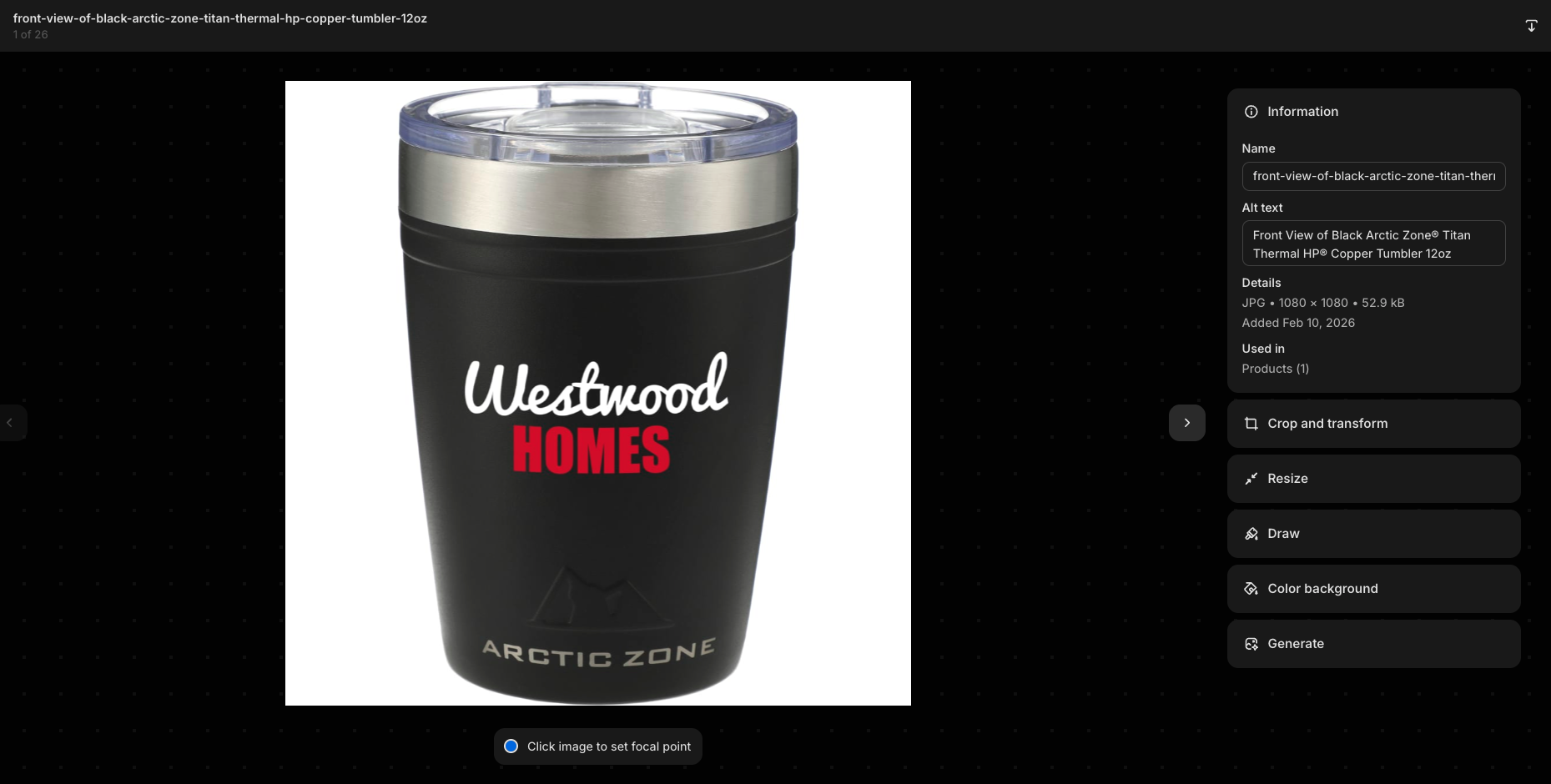
SEO-Friendly Images
PromoSync automatically renames product image files and generates descriptive alt text optimized for search engines — included free with all plans.
Google Merchant Center Integration
Google Merchant Center metafields are populated automatically on the Trial, Business, and Enterprise PSRESTful plans. Shops on lower plans can still buy this feature individually by enabling it from PromoSync settings.
Supported Fields
PromoSync populates 20+ Google Shopping metafields:
| Field | Metafield |
|---|---|
| Brand | google.custom.brand |
| GTIN | google.custom.gtin |
| MPN | google.custom.mpn |
| Condition | google.custom.condition |
| Product Category | google.custom.product_category |
| Age Group | google.custom.age_group |
| Gender | google.custom.gender |
| Material | google.custom.material |
| Pattern | google.custom.pattern |
| Size | google.custom.size |
| Size Type | google.custom.size_type |
| Color | google.custom.color |
See Google Merchant Fields for the complete list.
Bulk Admin Actions
Manage multiple products efficiently from Shopify’s product list:
- Update Inventory — Update stock levels from suppliers
- Update Prices — Recalculate prices with current pricing rules
- Update Metafields — Rebuild the full PromoSync metafield bundle on selected products
- Add New Variants — Add colors and sizes a supplier added after import, without touching existing variants
- Disable Price Updates — Prevent automatic price syncing for selected products
- Enable Price Updates — Re-enable automatic price syncing for selected products
- Apply Default Location Decorations — Apply decoration location rules to selected products
- Enrich Location Decorations — Wire each decoration to its Setup Fee and Run Charge product for correct checkout charges
- Onboard to PromoSync — Attach a supplier link to hand-created products so other bulk actions can run on them
- Link to PromoSync — Register existing/duplicated products so syncs skip redundant API calls (formerly Sync Duplicate Products)
See Bulk Actions Guide for details.
Storefront Widgets
Tier Pricing Block
Display quantity-based pricing tiers on product pages. Tier pricing is stored at the variant level in part_price_array:
{% raw %}{% assign tiers = variant.metafields.psrestful.part_price_array.value %}
{% if tiers %}
  <div class="tier-pricing">
    {% for tier in tiers %}
      <div class="tier">
        <span class="quantity">{{ tier.quantityMin }}+</span>
        <span class="price">{{ tier.price | divided_by: 100.0 | money }}</span>
      </div>
    {% endfor %}
  </div>
{% endif %}{% endraw %}
Note: Prices are stored as integers in cents (e.g., 1250 = $12.50).
Location Decorations Block
Show available decoration methods and locations:
{% raw %}{% assign locations = product.metafields.psrestful.location_decorations.value %}
{% if locations %}
  <div class="decoration-options">
    {% for location in locations %}
      <div class="location">
        <strong>{{ location.locationName }}</strong>
        <ul>
          {% for dec in location.decorations %}
            <li>{{ dec.decorationName }}</li>
          {% endfor %}
        </ul>
      </div>
    {% endfor %}
  </div>
{% endif %}{% endraw %}
See Storefront Widgets Guide for more examples.
Metafields
Product-Level Metafields
70+ metafields including:
- Basic product info (description, category, brand)
- Pricing data (tier pricing, MAP)
- Media (images, videos, documents)
- Specifications (dimensions, weight, materials)
- Compliance (safety warnings, certifications)
Variant-Level Metafields
Variant-specific data including:
- Color and size information
- UPC/GTIN barcodes
- Inventory quantities
- Supplier-specific attributes
See Metafields Reference for the complete list.
Default Location Decorations
Configure decoration rules to automatically assign decoration locations based on product tags:
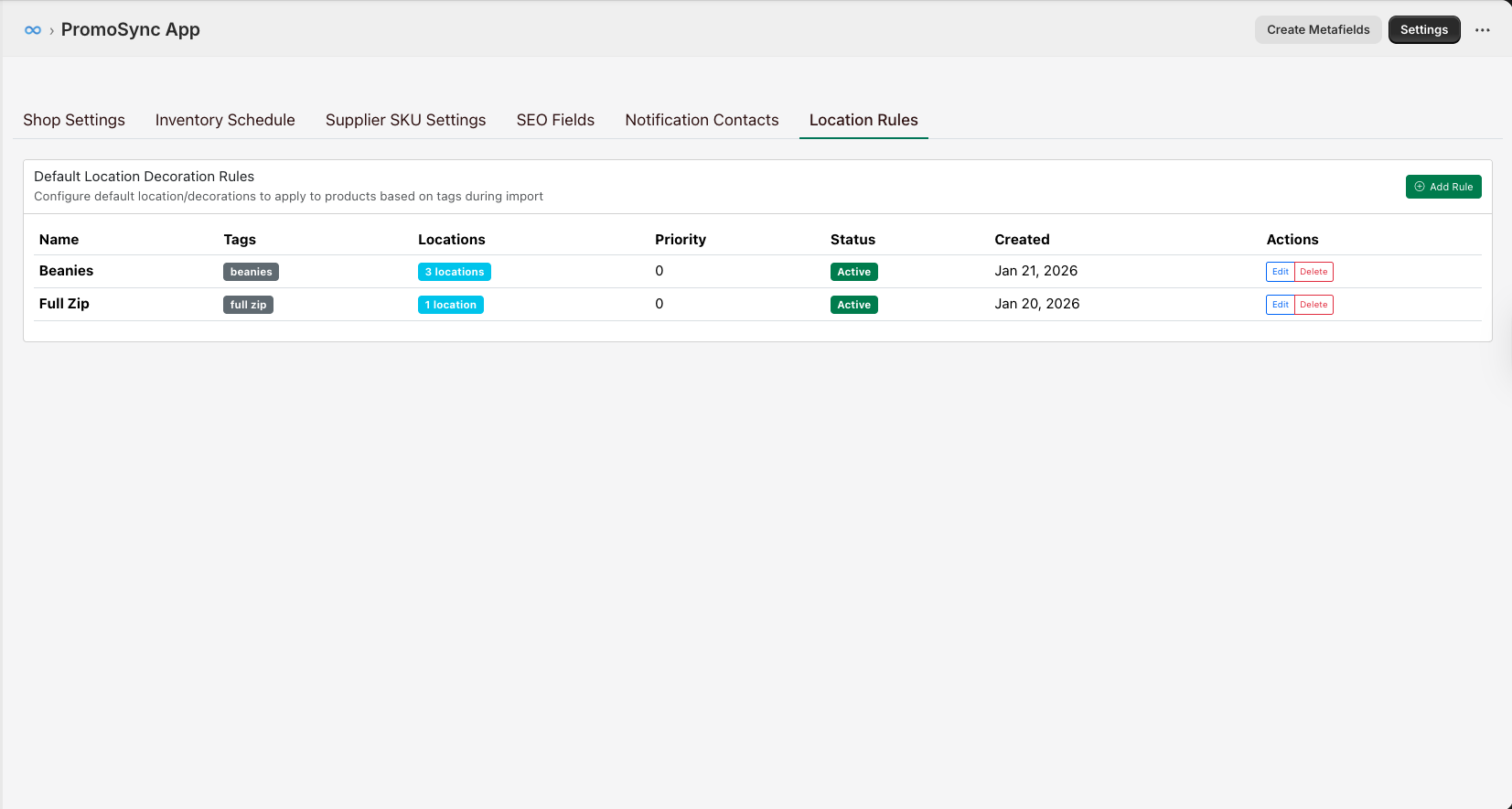
Click Add Rule or Edit to configure a rule:
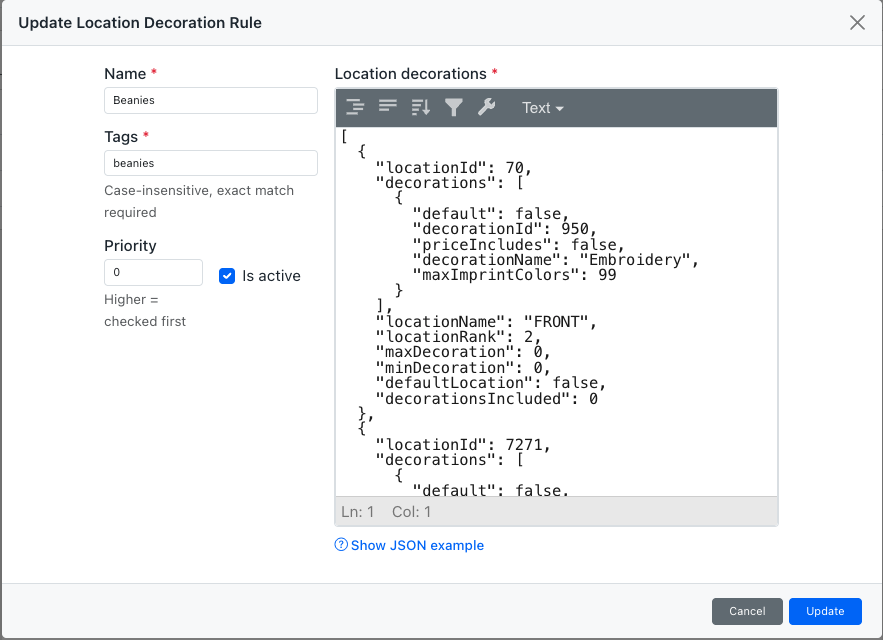
Automatically assign decoration locations based on product tags:
{
  "rules": [
    {
      "tag": "apparel",
      "default_location": "Left Chest",
      "default_method": "Embroidery"
    },
    {
      "tag": "drinkware",
      "default_location": "Wrap",
      "default_method": "Full Color"
    }
  ]
}
Manufacturer Management
Map Shopify vendors to PromoStandards supplier codes:
| Shopify Vendor | PromoStandards Code |
|---|---|
| SanMar | SanMar |
| S&S Activewear | SS |
| Hit Promotional | HIT |
See Manufacturer Mapping for configuration.
Sales Priority Sorting (Premium)
Order variants by sales performance:
- Best-selling variants appear first
- Automatic reordering based on sales data
- Configurable sorting rules
Feature Comparison
| Feature | Basic | Professional | Enterprise |
|---|---|---|---|
| Product Import | ✓ | ✓ | ✓ |
| Inventory Sync | ✓ | ✓ | ✓ |
| Standard Pricing | ✓ | ✓ | ✓ |
| Custom Pricing (MDP) | - | ✓ | ✓ |
| Multi-Location | - | ✓ | ✓ |
| Google Merchant | - | ✓ | ✓ |
| Sales Priority | - | - | ✓ |
| Dedicated Support | - | - | ✓ |