Pricing Configuration
PromoSync offers flexible pricing options to match your business model. This guide covers all pricing strategies and configuration options.
Pricing Strategies
MQ (Minimum Quantity)
Uses the lowest quantity tier price from the supplier’s pricing table.
Best for: Distributors selling to end consumers or businesses ordering small quantities.
// Example supplier pricing table
[
  {"minQuantity": 24, "price": 1250},
  {"minQuantity": 48, "price": 1100},
  {"minQuantity": 144, "price": 950},
  {"minQuantity": 288, "price": 825}
]

// MQ strategy selects: $12.50 (24 unit tier)
HUNDREDS
Calculates price per 100 units, useful for high-volume pricing.
Best for: Businesses that quote prices per hundred or per thousand units.
// Same pricing table
// HUNDREDS calculation:
// Uses 144-tier: $9.50/unit × 100 = $950.00 per hundred
MAP (Manufacturer’s Advertised Price)
Uses the manufacturer’s suggested retail price when available.
For now, we are only processing SanMar’s MAP pricing.
Markup / Discount Pricing (MDP)
Applies your own markup or discount percentage on top of a price base (Cost, List or MSRP), with optional rules per supplier and per brand.
Best for: Distributors who price from supplier net cost or want a different margin per supplier or brand.
Selling price = base price x (1 + percentage / 100)

// 25% markup on a $10.00 cost  ->  $12.50
// 10% discount on a $20.00 MSRP ->  $18.00
Selecting this strategy is what unlocks the Markup / Discount Pricing tab described below.
Setting Your Default Strategy
- Open PromoSync > Settings
- In the Pricing Configuration section, pick a strategy from the Price Calc. Method dropdown: Minimum Quantity, Pricing when buying Hundreds, Minimum Advertised Price or Markup / Discount Pricing
- Click Save
The strategy applies to every product import and price update for the shop.
Markup and Discount Configuration
Prerequisite: this section only appears after you set Price Calc. Method to Markup / Discount Pricing in Shop Settings and save. The Markup / Discount Pricing tab then shows up in the settings sidebar. If you cannot find it, check that setting first.
Manage your product pricing by adding markup or discount prices based on suppliers and brands. Open the Markup / Discount Pricing tab in the settings sidebar.
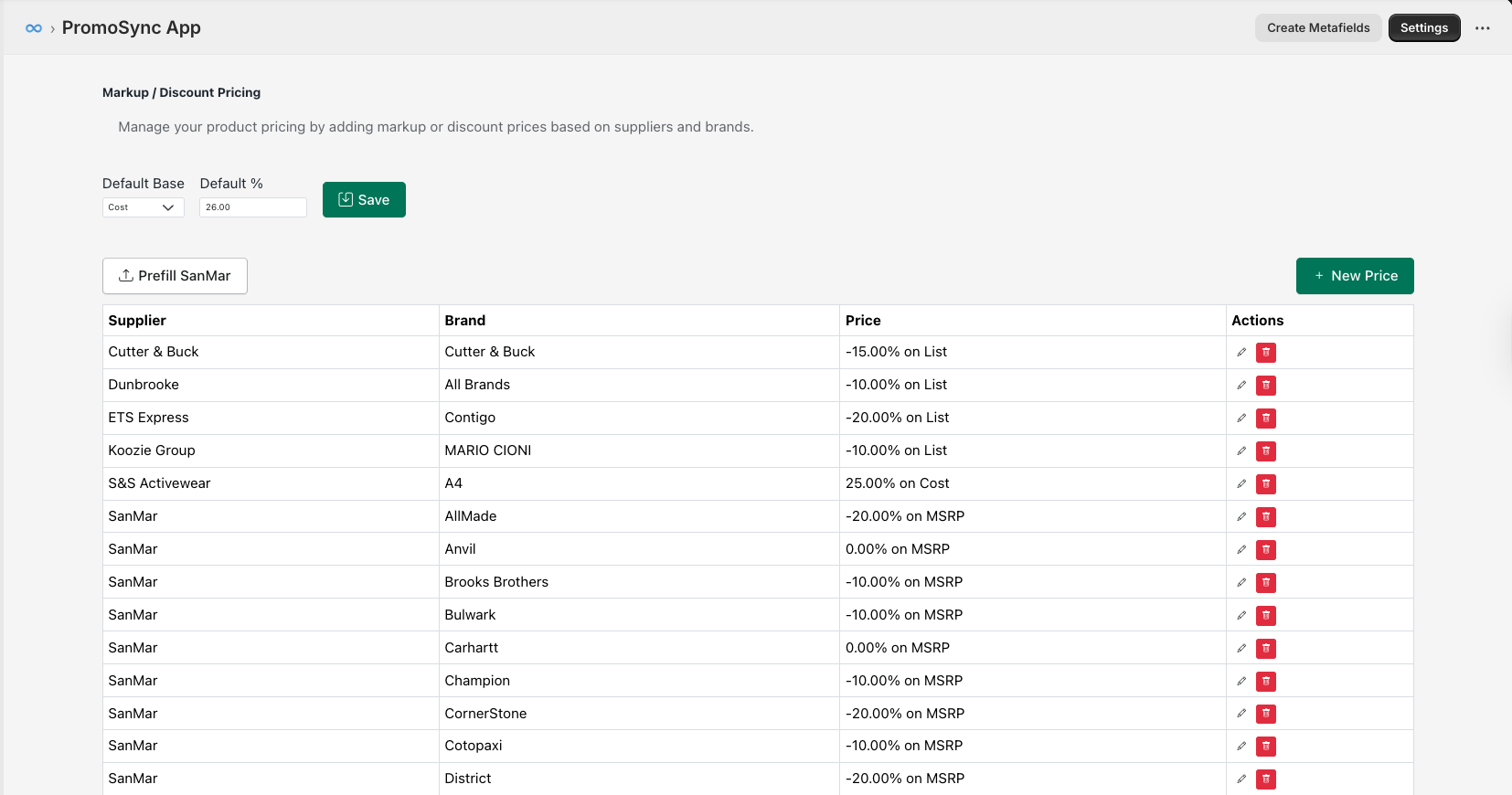
Default Markup
Set a default markup that applies to all products:
| Setting | Description |
|---|---|
| Default Base | The price base to apply markup on (Cost, List, or MSRP) |
| Default % | The percentage markup or discount |
The default applies to every product that has no matching supplier or brand rule. A Default % of 0 with a base of List simply sells at the supplier’s list price.
Supplier/Brand-Specific Rules
Create custom pricing rules for specific supplier and brand combinations. Click + New Price to add a rule:
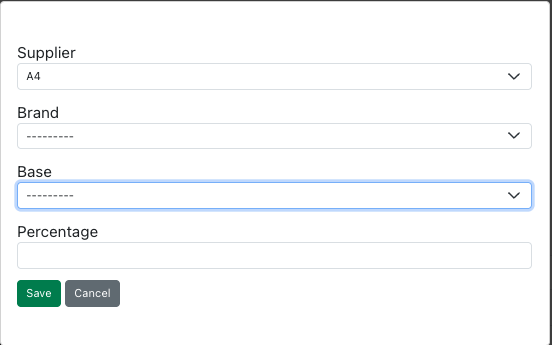
| Field | Description |
|---|---|
| Supplier | The supplier this rule applies to |
| Brand | The brand within the supplier (or “All Brands”) |
| Base | Price base: Cost, List, or MSRP |
| Percentage | Markup (positive) or discount (negative) percentage |
Price Base Options
| Base | Description |
|---|---|
| Cost | Supplier’s cost price |
| List | Supplier’s list price |
| MSRP | Manufacturer’s Suggested Retail Price |
Rule Priority
For each product PromoSync uses the most specific rule that matches:
- A rule for the product’s supplier and brand
- A rule for the supplier with Brand set to “All Brands”
- The shop Default Base and Default %
Example Rules
| Supplier | Brand | Price | Result |
|---|---|---|---|
| S&S Activewear | A4 | 25.00% on Cost | 25% markup on cost price |
| SanMar | Brooks Brothers | -10.00% on MSRP | 10% discount from MSRP |
| Dunbrooke | All Brands | -10.00% on List | 10% discount from list price |
How the Final Price Is Built
- Variant price: the supplier’s lowest quantity break goes through the formula and becomes the Shopify variant price.
- Quantity tiers: every quantity break goes through the same formula and is stored on the variant in the
part_price_arraymetafield (see Tier Pricing Display). Enable Volume Pricing to apply the lower tiers at checkout. - Decorated vs. blank: the Default Configuration Type setting decides which supplier price set feeds the base. Decorated uses the decorated price breaks, Blank uses the blank ones.
- Setup and run charges: decoration charges are not folded into the variant price. They are stored as decoration data on the product so they can be shown and added at the decoration step.
Prefill SanMar
Click Prefill SanMar to automatically populate recommended pricing rules for all SanMar brands based on their MSRP pricing structure.
Tier Pricing Display
Tier pricing data is stored at the variant level in the part_price_array metafield, following the PromoStandards specification.
// Stored in variant.metafields.psrestful.part_price_array
[
  {"quantityMin": 24, "price": 1250},
  {"quantityMin": 48, "price": 1100},
  {"quantityMin": 144, "price": 950},
  {"quantityMin": 288, "price": 825}
]
Note: Prices are stored as integers in cents for fast and exact calculations. For example, 1250 means $12.50.
Display in your theme:
{% raw %}{% assign tiers = variant.metafields.psrestful.part_price_array.value %}
{% if tiers %}
<table class="tier-pricing-table">
  <thead>
    <tr>
      <th>Quantity</th>
      <th>Price Each</th>
    </tr>
  </thead>
  <tbody>
    {% for tier in tiers %}
    <tr>
      <td>{{ tier.quantityMin }}+</td>
      <td>{{ tier.price | divided_by: 100.0 | money }}</td>
    </tr>
    {% endfor %}
  </tbody>
</table>
{% endif %}{% endraw %}
See Variant Metafields for more details on the part_price_array structure.
Currency Settings
| Setting | Description |
|---|---|
| Currency | Your store’s currency(PromoStandards offers USD, CAD) |
Note: PromoSync uses Shopify’s currency settings for display. Supplier prices are typically in USD.
Advanced: Per-Supplier Pricing
For supplier-specific pricing rules, see Custom Pricing (MDP).
Troubleshooting
Prices Not Updating
- Check that the product is still syncing (not removed from sync)
- Verify the supplier has updated pricing
- Manually trigger a sync from the product page
- Check for pricing errors in the sync log
Incorrect Pricing
- Verify your pricing strategy selection
- Check markup/discount configuration
- Review rounding settings
- Compare with supplier’s actual pricing table
MAP Pricing Unavailable
Not all suppliers provide MAP pricing. If MAP is selected but unavailable:
- PromoSync falls back to MQ pricing
- A warning is logged in the sync report