Google Merchant Fields
PromoSync populates metafields specifically for Google Merchant Center integration. These fields help optimize your products for Google Shopping campaigns.
Plan eligibility
Google Merchant metafields are populated automatically on the following PSRESTful plans:
| Plan | Google Merchant metafields populated? |
|---|---|
| Free | No |
| Standard | No |
| Premium | No |
| Business | Yes |
| Enterprise | Yes |
| Trial | Yes (for the duration of the trial) |
The Trial grants the same access as Business and Enterprise so you can evaluate the Google Shopping integration before committing. After the Trial ends, the metafields stop being populated on lower plans unless you have enabled the feature individually from PromoSync settings.
To upgrade your plan, visit psrestful.com/pricing.
Overview
Google Shopping requires specific product data to display your products effectively. PromoSync automatically populates these fields from supplier data, reducing manual data entry.
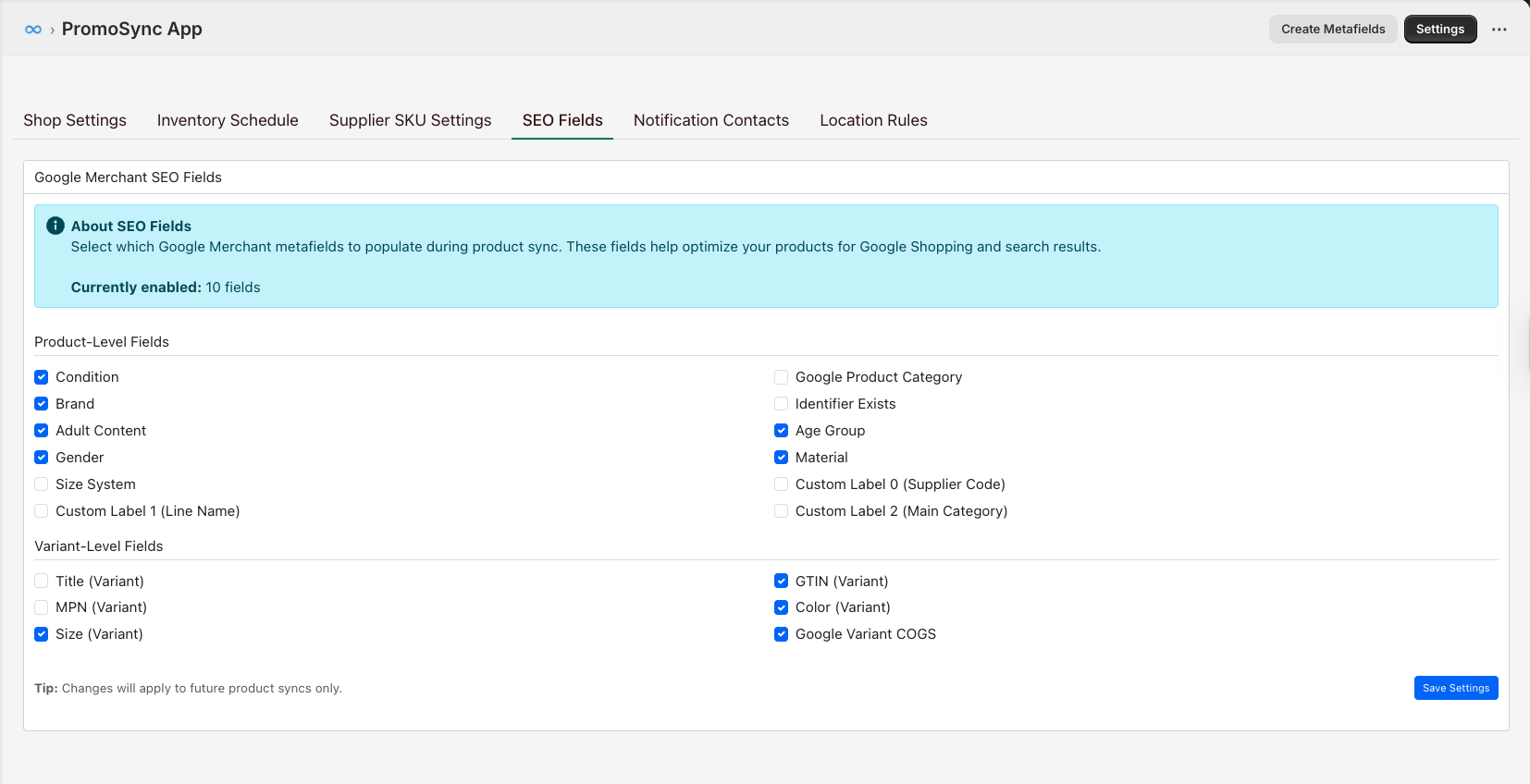
Namespace
All Google Merchant fields use the custom.google namespace:
{% raw %}{{ product.metafields.custom.google.brand }}
{{ product.metafields.custom.google.condition }}{% endraw %}
Product-Level Fields
These fields are attached to the product.
google_product_category
Google Product Category from Google taxonomy.
| Property | Value |
|---|---|
| Namespace | custom.google |
| Key | google_product_category |
| Type | single_line_text_field |
{% raw %}{{ product.metafields.custom.google.google_product_category }}
→ "Apparel & Accessories > Clothing > Shirts & Tops > T-Shirts"{% endraw %}
product_type
Merchant-defined product categorization.
| Property | Value |
|---|---|
| Namespace | custom.google |
| Key | product_type |
| Type | single_line_text_field |
{% raw %}{{ product.metafields.custom.google.product_type }}
→ "T-Shirts > Short Sleeve"{% endraw %}
condition
Product condition.
| Property | Value |
|---|---|
| Namespace | custom.google |
| Key | condition |
| Type | single_line_text_field |
Valid values: new, refurbished, used
{% raw %}{{ product.metafields.custom.google.condition }}
→ "new"{% endraw %}
brand
Brand name for Google Shopping.
| Property | Value |
|---|---|
| Namespace | custom.google |
| Key | brand |
| Type | single_line_text_field |
{% raw %}{{ product.metafields.custom.google.brand }}
→ "BELLA+CANVAS"{% endraw %}
identifier_exists
Whether product has GTIN, MPN, or brand.
| Property | Value |
|---|---|
| Namespace | custom.google |
| Key | identifier_exists |
| Type | boolean |
Set to false for custom or promotional products without standard identifiers.
{% raw %}{{ product.metafields.custom.google.identifier_exists }}
→ true{% endraw %}
adult
Whether product contains adult content.
| Property | Value |
|---|---|
| Namespace | custom.google |
| Key | adult |
| Type | boolean |
{% raw %}{{ product.metafields.custom.google.adult }}
→ false{% endraw %}
age_group
Target age group.
| Property | Value |
|---|---|
| Namespace | custom.google |
| Key | age_group |
| Type | single_line_text_field |
Valid values: adult, kids, toddler, infant, newborn
{% raw %}{{ product.metafields.custom.google.age_group }}
→ "adult"{% endraw %}
gender
Target gender.
| Property | Value |
|---|---|
| Namespace | custom.google |
| Key | gender |
| Type | single_line_text_field |
Valid values: male, female, unisex
{% raw %}{{ product.metafields.custom.google.gender }}
→ "unisex"{% endraw %}
material
Primary material of the product.
| Property | Value |
|---|---|
| Namespace | custom.google |
| Key | material |
| Type | single_line_text_field |
{% raw %}{{ product.metafields.custom.google.material }}
→ "Cotton"{% endraw %}
pattern
Pattern or print on the product.
| Property | Value |
|---|---|
| Namespace | custom.google |
| Key | pattern |
| Type | single_line_text_field |
{% raw %}{{ product.metafields.custom.google.pattern }}
→ "Solid"{% endraw %}
size_type
Size type for apparel.
| Property | Value |
|---|---|
| Namespace | custom.google |
| Key | size_type |
| Type | single_line_text_field |
Valid values: regular, petite, plus, tall, big, maternity
{% raw %}{{ product.metafields.custom.google.size_type }}
→ "regular"{% endraw %}
size_system
Size system used.
| Property | Value |
|---|---|
| Namespace | custom.google |
| Key | size_system |
| Type | single_line_text_field |
Valid values: US, UK, EU, DE, FR, JP, CN, IT, BR, MEX, AU
{% raw %}{{ product.metafields.custom.google.size_system }}
→ "US"{% endraw %}
Custom Labels
Custom labels for grouping products in Google Shopping campaigns.
| Key | Description |
|---|---|
custom_label_0 | Custom label 0 |
custom_label_1 | Custom label 1 |
custom_label_2 | Custom label 2 |
custom_label_3 | Custom label 3 |
custom_label_4 | Custom label 4 |
All custom labels are single_line_text_field type.
{% raw %}{{ product.metafields.custom.google.custom_label_0 }}
→ "best-seller"{% endraw %}
Common uses for custom labels:
custom_label_0: Supplier namecustom_label_1: Margin tier (high, medium, low)custom_label_2: Season (spring, summer, fall, winter)custom_label_3: Sale status (on_sale, clearance)custom_label_4: Performance (best_seller, new_arrival)
product_detail
Additional structured product details.
| Property | Value |
|---|---|
| Namespace | custom.google |
| Key | product_detail |
| Type | json |
{% raw %}{% assign details = product.metafields.custom.google.product_detail.value %}
{% if details %}
  <!-- Access structured product details -->
{% endif %}{% endraw %}
Variant-Level Fields
These fields are attached to individual product variants.
gtin
Global Trade Item Number (barcode).
| Property | Value |
|---|---|
| Namespace | custom.google |
| Key | gtin |
| Type | single_line_text_field |
| Owner | PRODUCTVARIANT |
{% raw %}{{ variant.metafields.custom.google.gtin }}
→ "882932789234"{% endraw %}
mpn
Manufacturer Part Number (variant SKU).
| Property | Value |
|---|---|
| Namespace | custom.google |
| Key | mpn |
| Type | single_line_text_field |
| Owner | PRODUCTVARIANT |
{% raw %}{{ variant.metafields.custom.google.mpn }}
→ "3001-BLK-L"{% endraw %}
title
Google Product Variant Title.
| Property | Value |
|---|---|
| Namespace | custom.google |
| Key | title |
| Type | single_line_text_field |
| Owner | PRODUCTVARIANT |
{% raw %}{{ variant.metafields.custom.google.title }}
→ "Unisex Jersey Tee - Black - Large"{% endraw %}
cost_of_goods_sold
Google Product Variant COGS.
| Property | Value |
|---|---|
| Namespace | custom.google |
| Key | cost_of_goods_sold |
| Type | single_line_text_field |
| Owner | PRODUCTVARIANT |
{% raw %}{{ variant.metafields.custom.google.cost_of_goods_sold }}
→ "8.25 USD"{% endraw %}
color
Color of the product variant.
| Property | Value |
|---|---|
| Namespace | custom.google |
| Key | color |
| Type | single_line_text_field |
| Owner | PRODUCTVARIANT |
{% raw %}{{ variant.metafields.custom.google.color }}
→ "Black"{% endraw %}
size
Size of the product variant.
| Property | Value |
|---|---|
| Namespace | custom.google |
| Key | size |
| Type | single_line_text_field |
| Owner | PRODUCTVARIANT |
{% raw %}{{ variant.metafields.custom.google.size }}
→ "Large"{% endraw %}
item_group_id
ID for grouping product variants.
| Property | Value |
|---|---|
| Namespace | custom.google |
| Key | item_group_id |
| Type | single_line_text_field |
| Owner | PRODUCTVARIANT |
{% raw %}{{ variant.metafields.custom.google.item_group_id }}
→ "3001"{% endraw %}
Complete Field List
Product-Level Fields
| Key | Type | Description |
|---|---|---|
google_product_category | text | Google Product Category |
product_type | text | Merchant-defined category |
condition | text | new, refurbished, used |
brand | text | Brand name |
identifier_exists | boolean | Has GTIN/MPN/brand |
adult | boolean | Adult content |
age_group | text | Target age group |
gender | text | Target gender |
material | text | Primary material |
pattern | text | Pattern/print |
size_type | text | Size type |
size_system | text | Size system |
custom_label_0 | text | Custom label 0 |
custom_label_1 | text | Custom label 1 |
custom_label_2 | text | Custom label 2 |
custom_label_3 | text | Custom label 3 |
custom_label_4 | text | Custom label 4 |
product_detail | json | Additional details |
Variant-Level Fields
| Key | Type | Description |
|---|---|---|
gtin | text | Global Trade Item Number |
mpn | text | Manufacturer Part Number |
title | text | Variant title |
cost_of_goods_sold | text | Variant COGS |
color | text | Variant color |
size | text | Variant size |
item_group_id | text | Variant grouping ID |
Shopify Google Channel Integration
These metafields work with Shopify’s Google channel app:
- Install the Google channel app from Shopify
- Connect your Google Merchant Center account
- PromoSync metafields automatically populate your product feed
- Products sync to Google Shopping
Troubleshooting
Missing Required Fields
If Google rejects products for missing data:
- Check if supplier provides the data
- Some custom/promotional products won’t have GTINs
- Set
identifier_existstofalsefor products without standard identifiers
Invalid Values
Google has strict value requirements:
| Field | Common Issue | Solution |
|---|---|---|
| gender | ”Men’s” instead of “male” | PromoSync normalizes values |
| condition | Missing | Defaults to “new” |
| age_group | Invalid value | Use enumerated values only |
Feed Errors
Common Google Merchant Center errors:
| Error | Cause | Solution |
|---|---|---|
Invalid GTIN | Checksum failure | Verify with supplier |
Missing brand | Not provided | Add manually or contact supplier |
Invalid category | Old taxonomy | Check Google taxonomy updates |