Theme App Extensions
PromoSync includes theme app extension blocks that you can add to your Shopify product pages using the Theme Customizer — no code changes required. These blocks work on any Online Store 2.0 theme (Dawn and compatible).
The PromoSync Pricing Engine app embed
Before adding any visible block, enable the PromoSync Pricing Engine app embed. This is a theme-wide embed (not a block on a specific section) that wires up the client-side JavaScript the visible blocks rely on — minimum-quantity enforcement on the quantity input and live tier-price recalculation when the shopper changes the variant or quantity.
To enable it, open the Theme Customizer, click the App embeds icon in the left sidebar, and switch PromoSync Pricing Engine on.
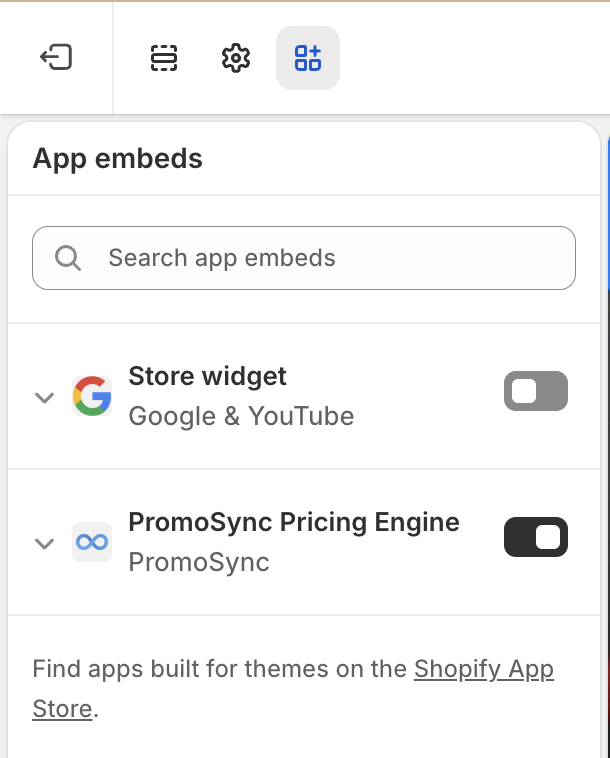
You only enable this once per theme. After that, the visible blocks below can be added and removed freely from individual templates.
Available Blocks
Volume Pricing (Display)
Display quantity-based price breaks in a table or horizontal layout. Reads from the psrestful.part_price_array variant metafield and updates automatically on variant change. Display-only.
Volume Pricing Function
The Shopify Function that actually discounts cart lines down to the matching tier price at checkout. Reads the same psrestful.part_price_array metafield as the display block. Activated via the Volume Pricing settings toggle, with per-variant and combined-by-product modes.
Minimum Quantity
Enforce per-product minimum order quantities on the quantity input. Optionally display a “Minimum order: N units” notice. Reads from the psrestful.minimum_quantity product metafield. Client-side enforcement only.
Decoration Selector
Let shoppers choose a decoration location and method via collapsible sections or cascading dropdowns. Selections are saved as cart line item properties. Reads from the psrestful.location_decorations product metafield.
How to Add a Block
All three blocks follow the same general setup:
- Go to Online Store > Themes > Customize
- Navigate to a Product page template
- Click Add block and switch to the Apps tab — every PromoSync block appears there
- Pick the block you want (Min Quantity Notice, PromoSync Decorations, PromoSync Tier Pricing, Volume Pricing Note)
- Configure the block settings and drag it to your preferred position on the page
- Click Save
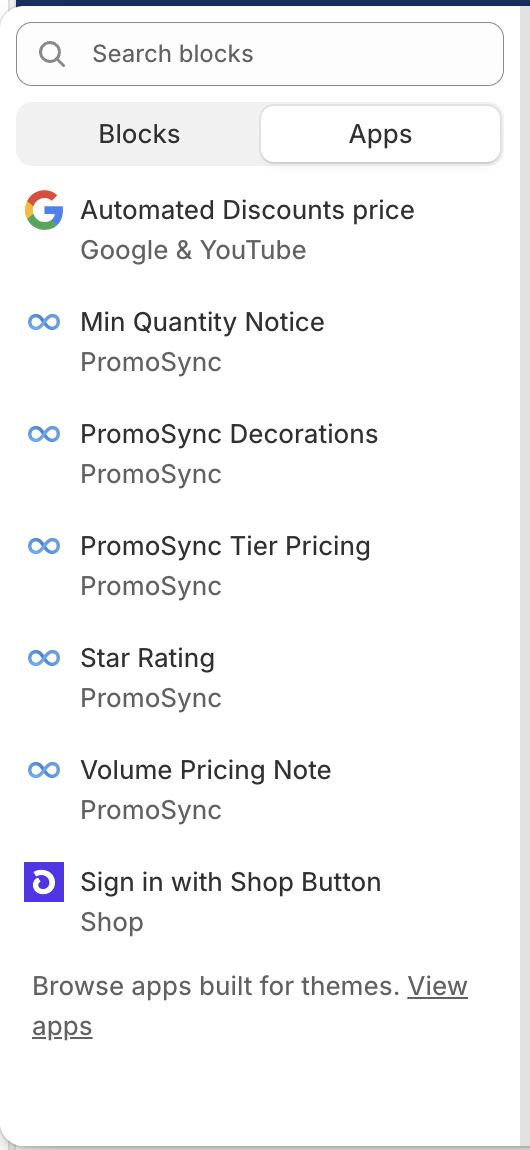
Each block only renders on products that have the relevant metafield data — they hide automatically when no data is available.
Prefer writing Liquid code? See the Storefront Widgets guide for manual Liquid implementations of tier pricing and decoration displays.